Until recently the fastest way to sort meeting tools was to ask one question: does a bot join the call? That question no longer separates anything. Circleback ships a bot-free desktop app on its free plan, and Notta now ships one too. Both record from your machine with no extra name in the participant list.
So the question moved. It is no longer how the audio gets captured, but what the sticker price actually covers once you turn on the features you came for.
That shift matters more than it sounds, because bot-free capture used to be the thing you paid a premium for. Now it is table stakes, and the differences that remain are the boring ones nobody puts on a landing page: which capability is bundled, which is an add-on, and what happens to the bill when the second language enters the room.
Quick Verdict
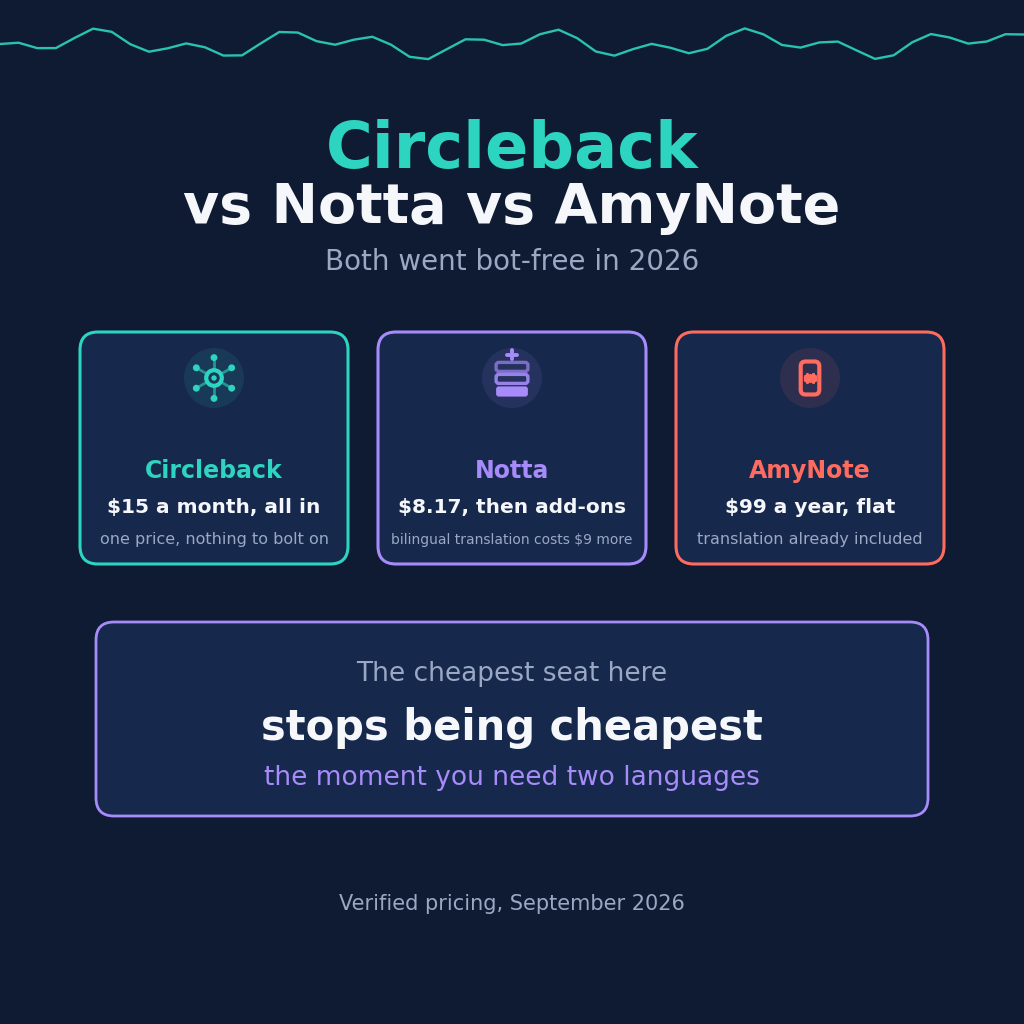
Circleback is the one-price option. Fifteen dollars per user per month on yearly billing covers over 100 languages, in-person capture, unlimited meetings and an explicit promise never to train on your data. Nothing important is sold separately.
Notta has the cheapest entry point here at 8.17 per user per month billed annually, plus the only real perpetual free plan with meaningful features. But bilingual translation is a paid add-on, and switching it on makes Notta the most expensive seat in this comparison.
AmyNote is 99 dollars a year for the whole account, not per seat, with translation into 100-plus languages included. It is iOS only, which rules it out for a lot of teams before anything else matters.
What We Compared
Pricing was read off each vendor’s own pricing page in September 2026, in US dollars, on annual billing. Language counts, privacy commitments and platform support came from the vendors’ own feature, security and FAQ pages.
One methodology note. Notta’s pricing page rewrites prices into the visitor’s local currency, so the figures below are the US dollar list prices. Notta’s monthly-billing plan prices could not be confirmed in dollars, so every comparison here uses annual billing.
That is worth stating plainly rather than burying, because currency-localised pricing pages are a recurring source of wrong numbers in this category. A comparison written from a page that silently rendered euros or yen will report a different figure for the same plan, and neither number is wrong — they simply are not comparable. Every figure below is the dollar list price on the annual toggle, and where a price could not be confirmed in dollars, it is left out rather than converted.
Feature and policy claims come from published vendor documentation rather than from review roundups, which in this category copy each other and go stale within a release cycle. Where a vendor states something plainly, it is quoted.
Circleback: Strengths and Weaknesses
Circleback’s free plan is unusually complete. It covers unlimited meetings, AI notes and action items, online and in-person capture, speaker-labeled transcripts, mobile and Apple Watch apps, and API, MCP and CLI access. The catch is retention: free keeps 30 days of history.
Paid tiers are mostly about how long recordings live. Pro at 15 dollars adds a year of recording storage and unlimited meeting history. Business at 25 adds two years, admin roles and unlimited free viewers. Enterprise at 35 adds unlimited storage, SSO and HIPAA.
That ladder is the honest shape of the product, and it is worth reading for what it implies. Past the free tier, most of what you are buying from Circleback is the right to keep what you already recorded. If your meetings stop mattering after a month, the free plan is not a teaser — it is the whole product. If they matter a year later, the pricing is really storage pricing wearing a features label.
On privacy the answer is short and unhedged. Asked whether data trains AI models, Circleback says no, it does not train AI models on customer data.
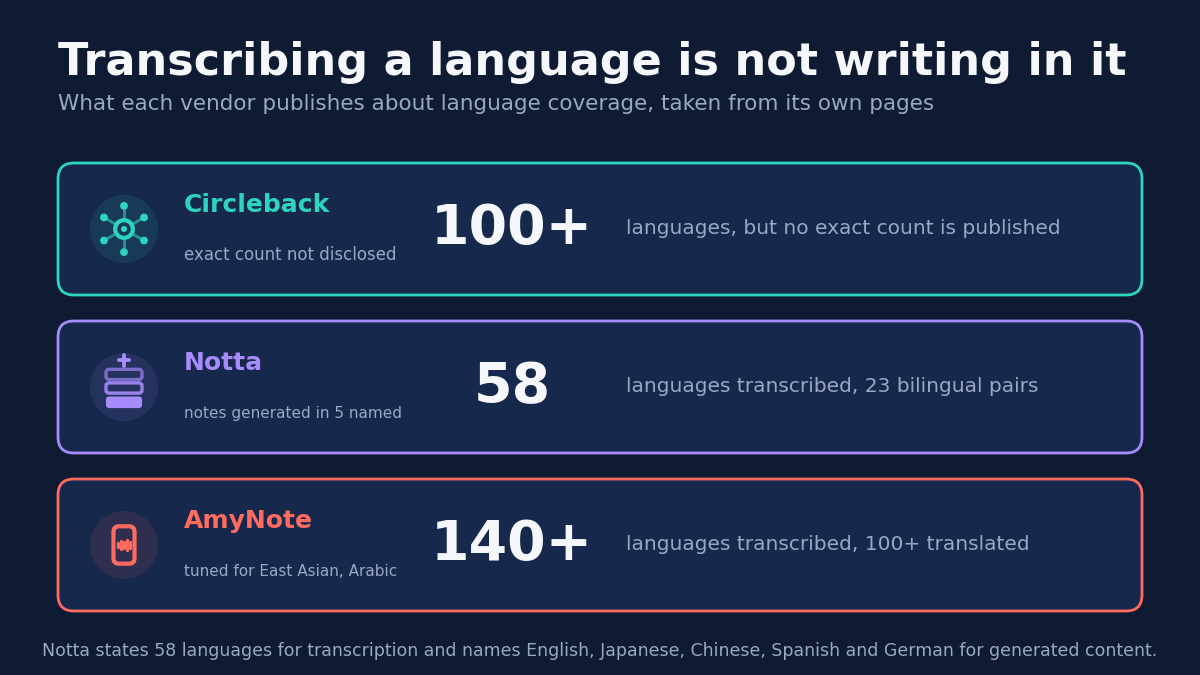
The weaknesses are real. It is the most expensive starting seat of the three, pricing is strictly per user, HIPAA needs an Enterprise sales conversation, and while Circleback advertises over 100 languages it publishes no exact count and no per-language quality detail. “Over 100” is a floor rather than a list, so if one specific language decides your purchase, you will be testing rather than reading.
Notta: Strengths and Weaknesses
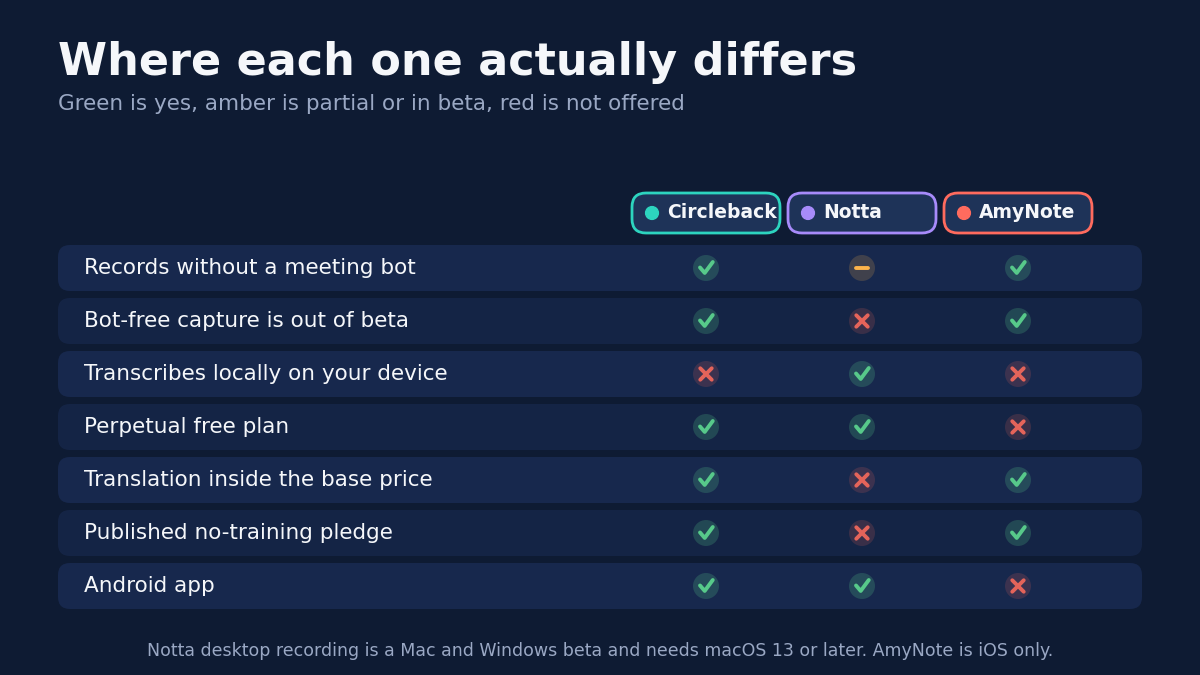
Notta changed more than any tool here in the last month, and mostly for the better. Notta Desktop records bot-free on both Mac and Windows, and it is included on every plan including the free one. More unusual is Privacy Mode, which transcribes on your own computer so meeting audio is never uploaded, keeps files in a local folder, works offline once set up, and is not metered against your cloud minutes. Nothing else in this comparison does local transcription at all.
That last point deserves emphasis, because it is the one capability here that no amount of budget buys elsewhere. For a team whose blocker is procurement rather than price — a security review that will not approve uploading meeting audio to a vendor at any tier — Notta is not the cheap option, it is the only option on the list.
Notta is honest about the limits. The desktop app is labeled beta on both platforms, needs macOS 13 or later, and Notta itself says to use Privacy Mode when privacy matters more than maximum accuracy. Local mode trades accuracy for control by the vendor’s own framing.
Coverage is 58 languages for transcription and 23 bilingual pairs. Read the FAQ carefully though: Notta names English, Japanese, Chinese, Spanish and German as the languages it generates content in. Transcribing a language and writing your summary in it are not the same capability.
That distinction is the single most likely way to buy the wrong tool here. A language count answers whether the transcript will come back readable. It does not answer whether the summary, the action items and the follow-up email will come back in the language your team actually reads. Those are separate lists at Notta, and only one of them is the number on the marketing page.
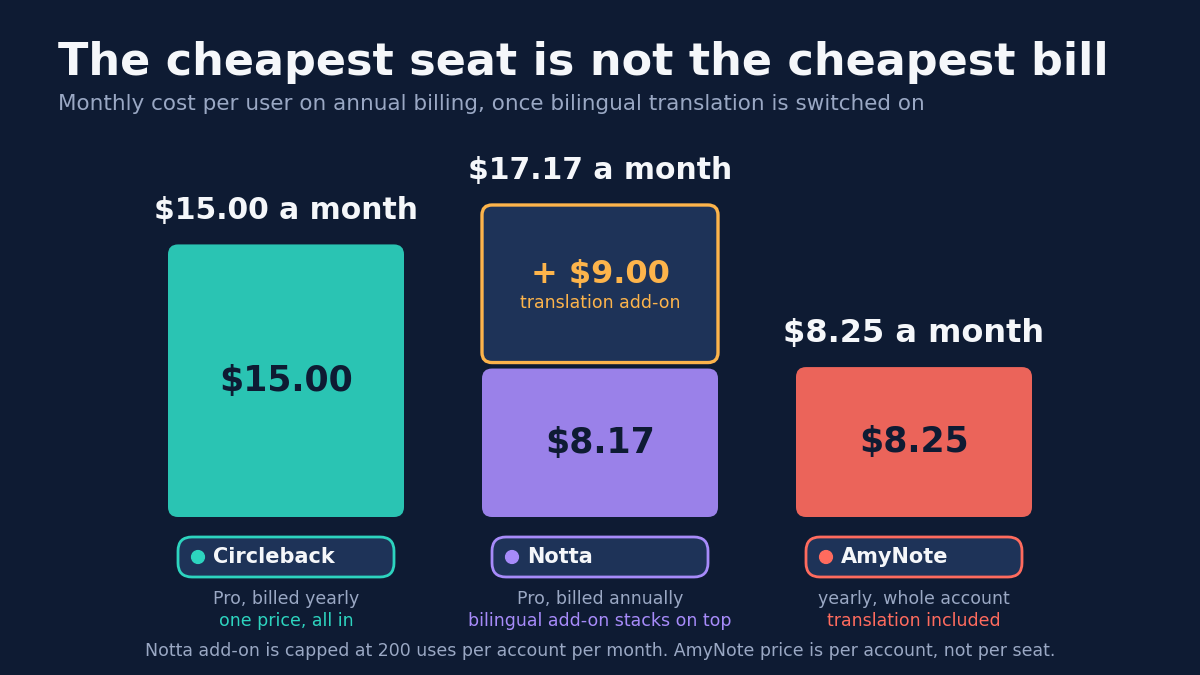
Then there is the pricing shape. Pro at 8.17 per month billed annually is genuinely the cheapest paid seat here. But bilingual transcription and translation is a 9 dollar per month add-on on top of that, only available on Pro and above, capped at 200 uses per account per month, with just four free uses monthly before you must buy it. A Notta seat that does bilingual meetings costs 17.17 per month, which is more than Circleback charges for everything included.
Note the shape of that cap as well as the price. Two hundred uses is an account-level ceiling rather than a per-seat allowance, which means the add-on gets scarcer as the team grows — the opposite of how per-seat pricing usually behaves. For one bilingual user it is generous. For a ten-person team running bilingual calls daily, it is a budget line that needs checking before rollout, not after.
The free plan also caps conversations at three minutes each, which is too short for a real meeting. And unlike the other two, Notta publishes no commitment that your meeting content stays out of AI training. Its compliance sheet is strong, covering SOC 2 Type II, ISO 27001, GDPR, CCPA and HIPAA with AES-256 at rest, but the only training language in its privacy policy is a narrow clause about Google Workspace API data, which is not the same as a promise about your recordings.
Absence of a pledge is not evidence of a bad practice, and it should not be read as one. But in a category where both of the other vendors here publish an explicit no-training sentence, the absence is a real difference in what you can hold a vendor to, and a procurement team will treat it as one.
AmyNote: Strengths and Weaknesses
AmyNote transcribes 140-plus languages and translates into 100-plus, tuned specifically for East Asian and Arabic, and none of that is an add-on. At 99 dollars a year it works out to about 8.25 a month, roughly Notta’s entry price, but for the whole account rather than per seat and with translation already in the box.
The per-account shape is the part worth understanding, because it moves in the opposite direction from everything else here. Per-seat pricing gets more expensive with each person added; a flat account price does not. That advantage compounds with team size — right up until the point where a growing team needs the administration, roles and provisioning features AmyNote does not have at all.
Transcription runs on OpenAI’s speech models and analysis on Anthropic’s Claude Opus. Both providers contractually guarantee zero training on user data. Audio is encrypted in transit and not retained after processing, and transcripts are stored locally on the device with end-to-end encryption.
The limitations are significant and worth stating plainly. AmyNote is iOS only. There is no Android app, no desktop app and no web app, so Notta and Circleback both beat it on platform reach outright. There are no CRM integrations, no video recording and no team or admin features. There is no perpetual free plan either, only a 3-day trial. And despite storing transcripts locally, the transcription itself happens in the cloud, so Notta’s Privacy Mode is the stronger option if audio must never leave the machine.
That last one is the distinction most likely to be misread in AmyNote’s favour, so it is worth being exact: local storage of the transcript and local processing of the audio are different guarantees. AmyNote offers the first. Notta’s Privacy Mode offers the second. If your requirement is that audio never leaves the device, that requirement points at Notta, not at us.
Side by Side
- Cheapest paid entry: Notta at 8.17, then AmyNote at about 8.25, then Circleback at 15
- Cheapest bilingual setup: AmyNote at about 8.25, then Circleback at 15, then Notta at 17.17
- Best free plan: Circleback, with unlimited meetings and a 30-day window
- Local on-device transcription: Notta only
- Published no-training pledge: Circleback and AmyNote
- Widest platform support: Circleback and Notta, both with Android and desktop
- Broadest language coverage: AmyNote at 140-plus
Which One Fits You
A team that wants one predictable number. Circleback. Nothing important is gated behind an add-on, the language list reads the same on free as on Enterprise, and the privacy answer is one sentence with no caveat. You are paying more per seat to stop thinking about which feature is included.
A team whose security review blocks cloud audio. Notta, and nothing else here. Privacy Mode transcribes on the machine, keeps files locally and works offline. Accept the vendor’s own framing on accuracy, and accept that the desktop app is still labeled beta.
A small team on Windows or Android with a tight budget and one language. Notta again, at 8.17. This is the case its entry price was built for, and the add-on that breaks the pricing never gets switched on.
Bilingual meetings, iPhone, no team administration needed. AmyNote. Translation is in the base price rather than a 9 dollar add-on with a 200-use ceiling, and the flat account price does not grow with headcount. The cost of that fit is everything on the platform list: no Android, no desktop, no free plan past three days.
The Bottom Line
Pick Circleback if you want one predictable number per seat and never want to think about which feature is gated. It has the best free plan and the cleanest privacy answer.
Pick Notta if your meetings are sensitive enough that transcription must happen on your own machine, or if you need Android and Windows coverage on a small budget. Just price the translation add-on before you compare, because the cheapest seat here stops being cheapest the moment you need two languages.
Pick AmyNote at amynote.app if you work across many languages, want translation and analysis included at a flat account price rather than per seat, and your team is on iPhone. If anyone needs Android or a desktop app, one of the other two is the better answer, and this comparison should have made that easy to see.
Originally published as an X Article by @AmyNoteApp.